
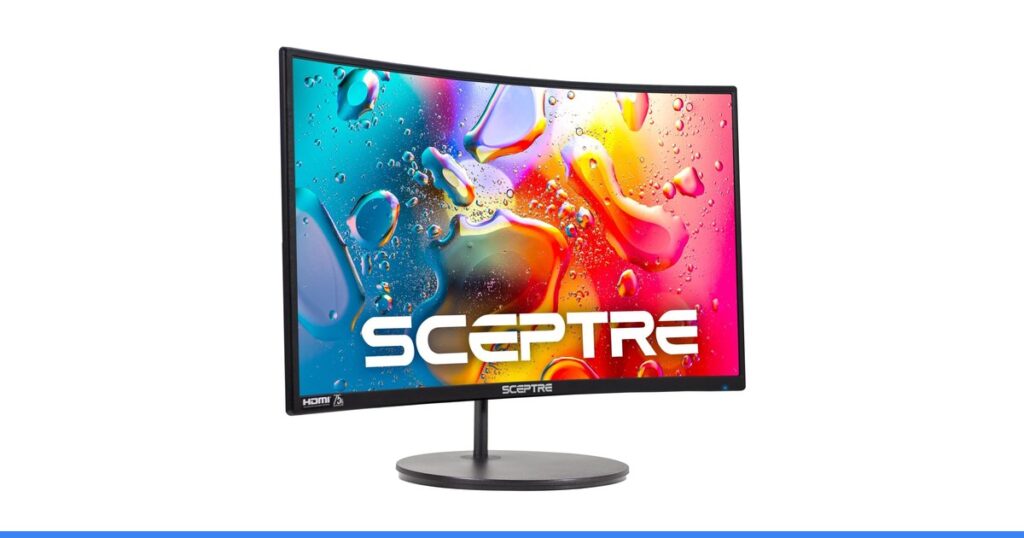
One monitor listing in this article states its curve radius two different ways on the same page – R1500 in the title, 1800R in its own bullet points. That is not a typo you can safely ignore; it is a clue about how much of a spec sheet is measurement and how much is decoration. We checked four claims against 31,563 buyer ratings, and the monitor that promises the least ended up with the cleanest record of the four.
The claims, and what the record says
| The number | What it promises | What buyers report |
|---|---|---|
| Sceptre 24in Curved | R1500 curve in the title, 98% sRGB, built-in speakers | The same listing says 1800R in its bullets – two different curves, one page |
| SANSUI 34in Ultrawide | Up to 200Hz, OD 1ms, 300 nits, 130% sRGB, DCI-P3, HDR | Performance is its largest complaint theme at 370 mentions |
| Samsung Odyssey G55C | 165Hz to ‘react in real time’, QHD, 1000R curve, HDR10 | Ghosting is an outright negative theme with 56 mentions |
| Philips 241V8LB | 100Hz, VA panel, flicker-free, 178-degree viewing angles | Six positive themes, no negative theme, and 4.6 stars |
How we check a claim
The method is the same for every claim. First we read what the listing actually promises, in its own words from the title and the bullet points. Second we read what buyers repeat afterwards: the recurring themes in the review record, and how many people raised each one. Third we look for the gap. On monitors that gap is unusually easy to find, because the numbers are precise enough to check.
Myth 1: Sceptre 24in Curved

A well-liked monitor whose own listing cannot agree with itself on the number in its title.
What the listing promises
The title advertises an R1500 curve on a 24-inch 1080p gaming monitor with 98% sRGB coverage, two HDMI inputs and built-in speakers. It is also genuinely popular: 22,764 ratings, a top-400 rank across all Electronics, 1,608 reviews praising the quality and 233 praising the curve specifically.
What the review record says
Read the bullet points and the curve becomes 1800R – a different curve from the one in the title, on the same page. The same listing describes 75Hz as a ‘high refresh rate’ on a monitor sold for gaming. And the review record carries two outright negatives: 270 mentions of the built-in speakers and 197 of durability.
What to check instead
Check whether the listing states its headline number consistently in the title, the bullets and the specification table. Where they disagree, treat the figure as decoration. And ignore the built-in speakers entirely when comparing – they are a negative theme here.
Seen on Sceptre 24in Curved (example product) — 4.6 stars from 22,764 ratings.
Myth 2: SANSUI 34in Ultrawide

The best panel in this comparison, and the lowest rated of the four.
What the listing promises
A genuinely impressive panel: 34 inches at 3440×1440, quoted at up to 200Hz with OD 1ms response, 300 nits, 130% sRGB, DCI-P3 coverage, HDR and picture-in-picture. 875 reviews praise the quality, 400 the image and 178 the colour, and it collects six positive themes in total.
What the review record says
Every headline number carries a hedge. ‘Up to’ 200Hz is the ceiling, not the default, and reaching it at 3440×1440 needs both a cable with the bandwidth and a graphics card that can render it. ‘OD 1ms’ is an overdrive figure rather than the panel’s native response. Performance is its biggest complaint at 370 mentions, with 122 more on connectivity.
What to check instead
Work out what your graphics card can actually push at the monitor’s native resolution before paying for refresh rate, and check which cable the high mode requires. Read the reviews’ performance mentions rather than the peak figure – they describe the default configuration.
Seen on SANSUI 34in Ultrawide (example product) — 4.4 stars from 4,623 ratings.
Myth 3: Samsung Odyssey G55C

The clearest example in consumer tech of two specifications being confused for one.
What the listing promises
Samsung quotes a 165Hz refresh rate that lets you react in real time as you speed through scenes, QHD resolution at 1.7x the pixel density of Full HD, a 1000R curve and HDR10. Owners agree on much of it: 331 reviews praise the screen quality, 165 call it good value and 126 praise the picture.
What the review record says
Refresh rate and response time are different specifications. Refresh rate is how often the image updates; ghosting is how long a pixel takes to change colour. That is why 56 reviews raise ghosting as an outright negative theme on a monitor advertising 165Hz – the high number does not address the problem it appears to promise.
What to check instead
If smearing behind moving objects is your concern, look for the response time and the panel type rather than the refresh rate, and read the ghosting mentions in the reviews. A high refresh rate is worth paying for when your hardware can feed it, but it is not a blur fix.
Seen on Samsung Odyssey G55C (example product) — 4.5 stars from 2,042 ratings.
Myth 4: Philips 241V8LB

The monitor claiming the least in this group, with the cleanest review record in it.
What the listing promises
This is the shortest specification list in the comparison. 100Hz stated plainly with no ‘up to’ in front of it, a VA panel for contrast, flicker-free operation, 178-degree viewing angles, and a 23.8-inch diagonal that the listing states exactly rather than rounding up in the body text.
What the review record says
It ties for the highest rating here at 4.6 from 2,134 ratings, with a top-300 rank in Electronics. Six themes come back positive – quality, value, picture, setup, size and connectivity – and it is the only monitor of the four with no negative theme at all. Its largest complaint is 59 mixed mentions of colour.
What to check instead
Treat a short specification list as a signal rather than a shortfall. Decide the two or three things you actually need – size, resolution, a refresh rate your hardware can feed – and let everything else go. The features you never use are still in the price.
Seen on Philips 241V8LB (example product) — 4.6 stars from 2,134 ratings.
What to read instead
Three habits cover this whole category. Check whether the listing states the same number twice – one of these contradicts itself in a single page. Read what ‘up to’ and ‘OD’ are hedging, because peak refresh and overdrive response are best cases rather than typical ones. And keep refresh rate and response time separate in your head: 165Hz is how often the image updates, ghosting is how slowly a pixel changes colour, and the first number does not fix the second.
If the screen has to travel, our portable monitor comparison ranks the panels on the same evidence. The habit generalises: our tech specs guide covers it across categories, and the megapixel myth is the same arithmetic on a sensor.
Frequently Asked Questions
What does the curve radius R1500 or 1800R mean on a monitor?
It is the radius of the circle the screen curve would form, in millimetres – so a smaller number is a tighter curve. R1500 and 1800R are genuinely different curves, which makes it notable that the Sceptre listing here uses R1500 in its title and 1800R in its own bullet points. When a seller cannot state a figure consistently on one page, treat it as marketing rather than specification.
Does a higher refresh rate stop ghosting?
No, and this is the most useful distinction in the whole category. Refresh rate is how many times per second the image updates. Ghosting is how long a pixel takes to change colour, which is response time – a different specification entirely. The Samsung Odyssey G55C here advertises 165Hz and still collects ghosting as an outright negative review theme with 56 mentions.
What does ‘up to 200Hz’ actually mean?
That 200Hz is the ceiling under ideal conditions, not what you will necessarily get. Reaching it on the SANSUI’s 3440×1440 ultrawide panel needs a cable that carries the bandwidth and a graphics card able to render that many frames at that resolution. Performance is that monitor’s largest complaint theme at 370 mentions, and connectivity adds 122 more.
Are monitor built-in speakers any good?
Rarely, and here they are an outright negative. The Sceptre includes speakers and 270 reviews raise sound quality as a negative theme – the same pattern we found across four mini projectors, where sound was a mixed theme on every single one. Treat built-in speakers as a convenience for system beeps, not as audio you will actually use.
Is a longer spec sheet a better monitor?
Not on this evidence, and that is the fourth myth here. The Philips 241V8LB claims the least of the four – 100Hz stated plainly, a VA panel, flicker-free, no curve figure and no HDR headline – and it ties for the highest rating at 4.6 with six positive review themes and no negative theme at all. The monitor with 200Hz, HDR and DCI-P3 coverage is the lowest rated of the four.
What actually matters in this category
Researched from real buyer evidence by the Technocastel editorial team — last reviewed 22 August 2026.
Start by checking the listing against itself. One monitor in this article states its curve radius as R1500 in the title and 1800R in the bullets, which are two different curves on one page. A seller who cannot keep a number consistent is telling you how much that number was measured and how much it was chosen.
Learn what the hedge words carry. ‘Up to’ in front of a refresh rate means the ceiling, not the typical case. ‘OD’ in front of a response time means overdrive, a processing mode with its own trade-offs, rather than the panel’s native figure. Neither is deceptive, and neither describes what you will see by default.
Keep refresh rate and response time apart. They sound like the same idea and they solve different problems: refresh rate governs how often the picture updates, response time governs how cleanly each pixel changes. A monitor can advertise a very high refresh rate and still smear, which is exactly what 56 ghosting reports on a 165Hz panel look like.
Finally, be suspicious of a long specification list rather than reassured by it. The plainest listing in this comparison – one refresh rate, one panel type, no curve figure – produced six positive review themes and no negative ones. The most decorated spec sheet produced the lowest rating. Features that go unused still have to be paid for.
Related guides
- The same treatment applied to mini projectors is in our projector spec check
- If the screen needs to travel, read our portable monitor comparison
- For webcams, speakers and star ratings checked the same way, see our tech specs guide
How this article was made. The ranking comes from the public review record — rating counts, star distributions and the themes owners repeat — tallied with software, then read, judged and written up by Abdelaziz Sabbah. We do not lab-test these products and no brand pays for placement; our full method is here. Review counts are a floor at the date above and prices change, so confirm both on the retailer’s page before you buy. As an Amazon Associate we earn from qualifying purchases — affiliate disclosure.