
This is not a ranking. Across 44,370 buyer ratings on four USB C docking stations from four different brands, the same complaint comes back: the dock stops working. On three of the four, reliability is an outright negative review theme rather than a mixed one. On the fourth, reliability is praised – by 52 people – while display glitching is the complaint instead. And the dock with the highest star rating on this page carries the largest reliability complaint of all four.
Quick Comparison
| Rank | Docks | Key Spec | Best For | Rating |
|---|---|---|---|---|
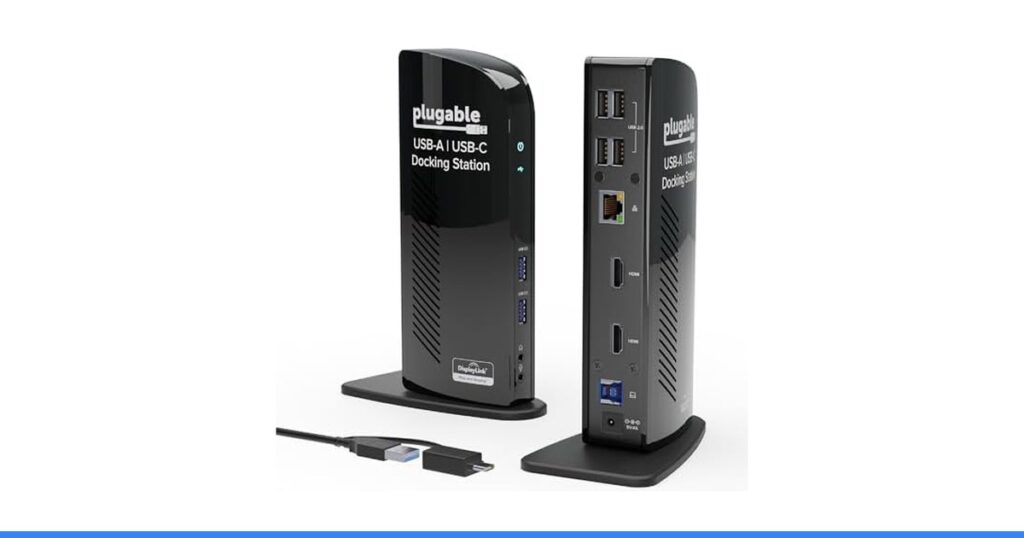
| 1 | Plugable Universal Laptop Docking Station Dual HDMI Monitor for Windows and Mac (Driver Required), USB 3.0 or USB-C, 2X HDMI, Gigabit Ethernet, Audio, 6 USB Ports (UD-3900) | USB 3.0, dual 1920×1200 | You want the strongest praise and you can live with the risk | 4.5 (11,852) |
| 2 | Selore USB C Docking Station Dual Monitor, USB C to Dual HDMI Adapter | 8-in-1, dual 4K 60Hz | You are on Windows and you want MST dual-screen extension | 4.4 (22,090) |
| 3 | Anker Laptop Docking Station Dual Monitor, 8-in-1 USB C Hub with 4K HDMI | 8-in-1, 4K 30Hz dual | You are on Windows and you want a brand with support behind it | 4.3 (6,695) |
| 4 | UGREEN USB C Docking Station Dual Monitor, 10-in-1 Laptop Dock with 2 HDMI | 10-in-1, dual 4K 60Hz | You want the most ports and you can return it easily | 4.3 (3,733) |
The One With the Strongest Praise
Plugable Universal Laptop Docking Station Dual HDMI Monitor for Windows and Mac (Driver Required), USB 3.0 or USB-C, 2X HDMI, Gigabit Ethernet, Audio, 6 USB Ports (UD-3900) collects the strongest praise in this comparison by a wide margin – 2,400 mentions of functionality and 2,100 of build quality, with 1,000 more on how easily it sets up. It is also the dock with the biggest reliability complaint here, at 581 mentions, where owners describe it randomly stopping work for days at a time. Both of those things are true at once, which is the whole point of this page.
#1 Plugable UD-3900 — Strongest Praise, Biggest Complaint

Rating: 4.5 out of 5 from 11,852 ratings | Key spec: USB 3.0, dual 1920×1200 | Amazon rank: #29 in Docking Stations
4.5 stars from 11,852 ratings – the highest score here and the strongest praise anywhere on this page: 2,400 mentions of functionality, 2,100 of quality, 1,000 on easy setup and 639 on value. It also carries the largest reliability complaint of the four at 581 mentions, with owners describing a dock that randomly stops working for days. Compatibility is mixed at 717. No 4K, DisplayLink driver required, and it does not charge your laptop.
What Owners Praise
- 2,400 on functionality: The largest single theme across all four docks here
- 2,100 praise the build: Plus 1,000 more on how easily it sets up
- 639 cite value: One owner calls it a third the cost of a TB3 dock
What Goes Wrong
- 581 on reliability: Negative, and the largest reliability complaint of the four
- 717 on compatibility: Mixed – some report it does not work with MacBooks
- It will not charge your laptop: Stated plainly in the listing: no power delivery to the host
#2 Selore 8-in-1 Dock — Deepest Record

Rating: 4.4 out of 5 from 22,090 ratings | Key spec: 8-in-1, dual 4K 60Hz | Amazon rank: #7 in Docking Stations
4.4 stars from 22,090 ratings, the deepest review record in this comparison. 1,300 mentions of functionality and 1,100 of build quality, with 395 on portability and 332 on the ports. Reliability is negative at 309, where owners report it stopping after about a month. Compatibility is mixed at 533 with MacBooks named, and fit is mixed at 282 – it sits flush only without a case.
What Owners Praise
- 1,300 on functionality: The second-largest positive theme across all four docks
- 1,100 praise the build: Owners describe it as well made
- 395 on portability: Plus 332 more singling out the port selection
What Goes Wrong
- 309 on reliability: Negative – owners report it stops working after about a month
- 533 on compatibility: Mixed, and some report it will not work with their MacBook
- 282 on fit: Mixed – it sits flush, but not with a case on the laptop
#3 Anker 8-in-1 Dock — Two Negative Themes

Rating: 4.3 out of 5 from 6,695 ratings | Key spec: 8-in-1, 4K 30Hz dual | Amazon rank: #5 in Docking Stations
4.3 stars from 6,695 ratings and #5 in Docking Stations. Connectivity leads the praise at 303 mentions, with 118 on easy setup and 87 on the compact size. Two themes come back negative: reliability at 283 with reports of frequent failures, and usability at 80. Dual monitor compatibility is mixed at 273, where Mac users report the second screen does not work. 9% of its ratings are one star, the highest share here.
What Owners Praise
- 303 praise connectivity: Its largest theme, and the thing you buy a dock for
- 118 on easy setup: Plug and play, according to owners
- 87 on compact size: One owner reports driving three working screens from it
What Goes Wrong
- 283 on reliability: Negative – owners report frequent failures
- 80 on usability: Its second negative theme, across 6,695 ratings
- 273 on dual monitors: Mixed, and Mac users report the second screen does not work
#4 UGREEN Revodok 10-in-1 — Most Ports, Thinnest Record

Rating: 4.3 out of 5 from 3,733 ratings | Key spec: 10-in-1, dual 4K 60Hz | Amazon rank: #28 in Docking Stations
4.3 stars from 3,733 ratings, and the only dock here where reliability is praised rather than criticised – by 52 people. Every theme in its record is small: 38 on quality, 21 on ports, 14 on value, 8 on ease of use. Two themes are negative: heat at 9 and display reliability at 8, with reports of glitching and flickering. The most functions on paper, the least evidence behind them.
What Owners Praise
- 52 call it reliable: Its largest theme – though every theme in its record is small
- 38 on build quality: Plus 21 more on the port selection and 14 on value
- 8 cite ease of use: A short record, but the praise it does have is consistent
What Goes Wrong
- Display reliability negative: Only 8 mentions, but what they report is glitching and flickering
- 9 report heat: Its second negative theme, on a 3,733-rating record
- The thinnest theme record: Its biggest theme has 52 mentions; the Plugable’s has 2,400
How We Read a Complaint Report
A complaint report is read differently from a ranking. First, which themes come back as outright negatives rather than merely mixed – that distinction is what separates a quirk from a defect. Second, what the listings themselves admit in the fine print, because three of these four disclose the macOS limitation in their own bullets. Third, what all four have in common, because that is the part that should change how you buy rather than which one you buy.
If the second screen is the reason you want a dock, read our portable monitor comparison. If you only need the wired network port, see our USB to ethernet adapter comparison. For the other half of a desk setup that drops out, read our home WiFi router comparison.
Should You Buy One At All?
If you need a dock, buy on the platform it actually supports and test it hard inside the return window. On Windows, the Selore is the one that lists MST dual-screen extension, and it has the deepest record here at 22,090 ratings. If you want the strongest praise and the only warranty quoted on this page, the Plugable carries a 2-year cover and lifetime support – but note it tops out at 1920×1200, supports no 4K, needs a DisplayLink driver, and will not charge your laptop. The Anker is the pick if you want a large brand behind the support line. The UGREEN has the most ports and the thinnest review record, so treat its reassurances as provisional. What none of them offers is a clean reliability record.
Frequently Asked Questions
Why do USB-C docking stations stop working?
Whatever the cause, it is not confined to one brand. Reliability is an outright negative review theme on three of the four docks here – 581 mentions on the Plugable, 309 on the Selore and 283 on the Anker – and owners describe the same thing each time: a dock that worked and then did not. On the fourth, the UGREEN, reliability is praised but display reliability goes negative with reports of glitching and flickering.
Will a USB-C dock run two different monitors on a Mac?
On three of these four, no – and the listings say so themselves. The Selore states that on macOS it mirrors only and that MST dual-screen extension is Windows-only. The Anker states that on macOS both external monitors show the same image. The UGREEN states that due to macOS limitations all docking displays show the same content. The Plugable takes a different route, using a DisplayLink driver you install manually on macOS.
Does a more expensive or higher-rated dock last longer?
Not on this evidence. The highest-rated dock on this page is the Plugable at 4.5 stars, and it carries the largest reliability complaint of the four at 581 mentions. The rating tells you how most buyers felt overall; the negative theme tells you what the unhappy ones kept running into. They are different questions.
Do docking stations charge your laptop?
Some do and some do not, and it is worth checking on the specific listing rather than assuming. The Selore, Anker and UGREEN all list USB-C power delivery pass-through at up to 85W, with the charger usually not included. The Plugable states plainly that it does not charge the host laptop at all.
What should I do in the first week after buying a dock?
Connect everything you actually intend to use – both monitors, ethernet, every peripheral – and leave it running through a few sleep and wake cycles. The failures described in these reviews tend to appear after some weeks of use, not on day one, so the point is to get as much real use into the return window as you can.
Final Thoughts
Four brands, 44,370 ratings, one failure mode. Reliability is negative on the Plugable at 581 mentions, the Selore at 309 and the Anker at 283, and on the UGREEN it is display reliability that goes negative instead. Switching brands does not solve this, and paying for the highest-rated model does not either. Buy where returns are painless, connect everything you plan to use in the first week, and treat a dock as a component that will eventually fail rather than one that will not.
What actually matters in this category
Researched from real buyer evidence by the Technocastel editorial team — last reviewed 22 August 2026.
Read the negative themes separately from the mixed ones. A mixed theme means buyers disagree; a negative theme means they agree something is wrong. On this page reliability is negative on three docks and merely praised on the fourth by 52 people, and that distinction matters far more than the tenth of a star between them.
Check what the listing already admits before you check the reviews. Three of these four state the macOS mirroring limitation in their own bullet points, and the Plugable states outright that it does not charge your laptop. A surprising amount of buyer disappointment in this category is disclosed in advance and simply not read.
When a complaint appears across every product in a category, stop shopping for a brand that has solved it. Reliability complaints turn up on all four docks here, from a large brand, a specialist and two value makers alike. The useful response is a painless return path and hard testing in the first week, not a fifth product.
Finally, treat the star rating and the failure rate as different measurements. The best-rated dock in this comparison also has its biggest reliability complaint. Most buyers were happy, and a substantial minority had the thing stop working – both facts live inside the same 4.5 stars, and only one of them is visible from the search results page.
Related guides
- our portable monitor comparison
- our USB to ethernet adapter comparison
- our home WiFi router comparison
How this article was made. The ranking comes from the public review record — rating counts, star distributions and the themes owners repeat — tallied with software, then read, judged and written up by Abdelaziz Sabbah. We do not lab-test these products and no brand pays for placement; our full method is here. Review counts are a floor at the date above and prices change, so confirm both on the retailer’s page before you buy. As an Amazon Associate we earn from qualifying purchases — affiliate disclosure.